
Managing travel approvals can feel like a hassle, but a well-designed workflow saves time, reduces costs, and keeps expenses under control. Here’s what you need to know about travel approval workflows in 2025:
- Why it matters: Manual email approvals cause delays, leading to higher costs (e.g., flight prices rising by 20% due to late approvals). Companies lose 5% of annual revenue to expense fraud and policy violations.
- Key trends: Businesses are adopting automated systems, mobile apps, and cloud-based platforms for faster approvals and better compliance. Features like “at-booking” enforcement block non-compliant options immediately.
- Benefits: Automation cuts travel costs by 10–20%, reduces non-compliant expenses by 26%, and saves 25–40 hours of manual work per 100 trips.
- How to improve: Audit your current process, create clear approval hierarchies, and use tools like mobile-first approvals, automated policy checks, and real-time analytics.
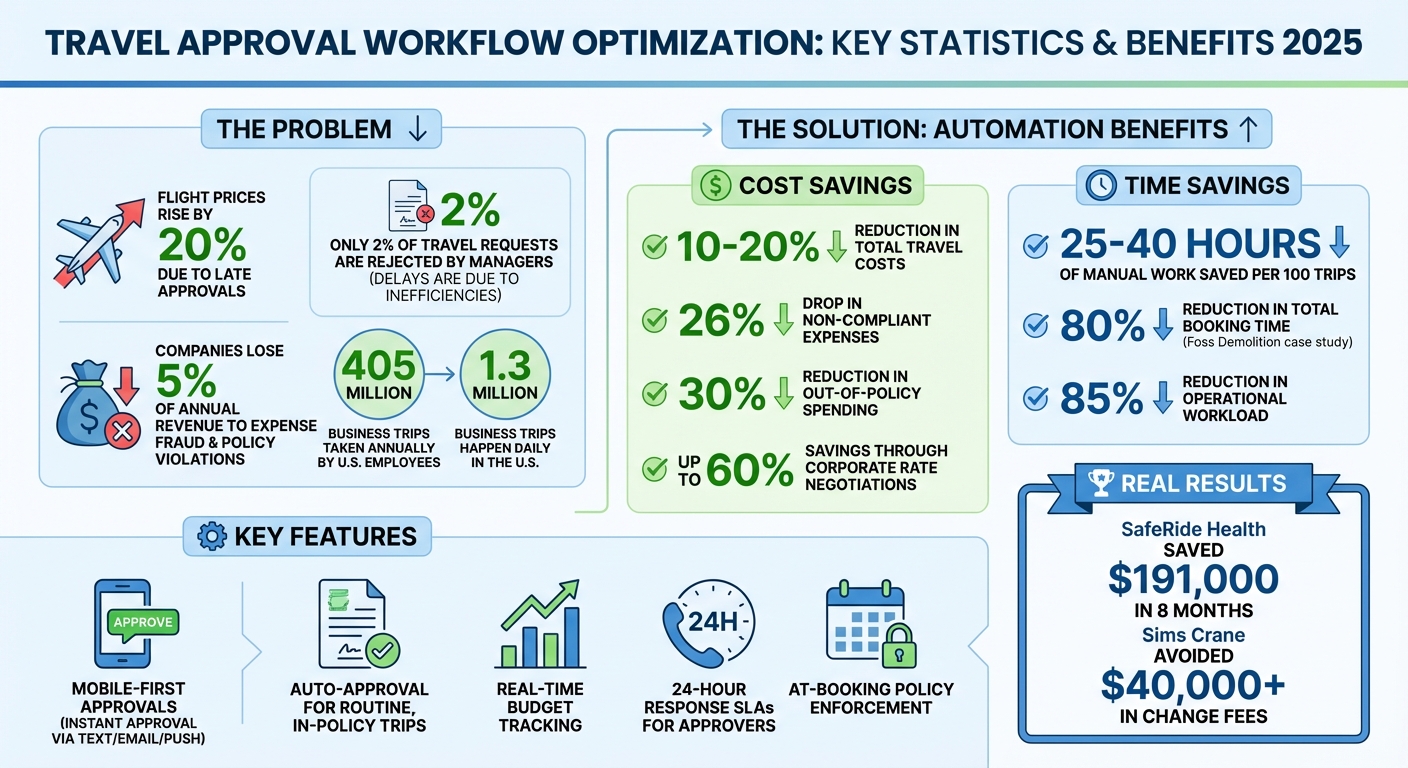
Travel Approval Workflow Optimization: Key Statistics and Benefits 2025
Benefits of Optimizing Travel Approval Workflows
Better Efficiency and Time Savings
When travel approval workflows are automated, everything becomes more streamlined. Travel requests are centralized, eliminating the need for endless email threads and scattered spreadsheets. Managers can approve requests instantly using mobile devices through text, email, or push notifications. For routine, low-cost trips that align with company policies, many businesses implement auto-approval rules, reserving manual reviews for high-risk or costly requests.
The results? Major time savings. Take Foss Demolition, for example – they cut their total booking time by 80% by using a system that displayed only compliant hotel options. Similarly, Sims Crane avoided over $40,000 in change fees by enabling managers to quickly approve exceptions, preventing delays in the booking process.
Stronger Budget Control and Visibility
Optimized workflows do more than speed up approvals – they also strengthen financial oversight. These systems track estimated trip costs in real time, comparing them against departmental budgets to prevent overspending before bookings are finalized. They also block out-of-policy options, like hotels exceeding price limits, from search results. This proactive approach creates a digital audit trail, recording who submitted and approved each request, making financial reconciliations and audits much smoother.
The impact on expenses is clear. Companies using automated expense approval systems report a 26% drop in non-compliant expenses. For instance, SafeRide Health saved $191,000 in just eight months by enforcing policy controls and using consolidated billing during bookings. Such financial discipline not only curbs unnecessary spending but also sets the stage for scaling operations without adding administrative complexity.
Scalability and Future-Readiness
Relying on manual processes like email and spreadsheets becomes a serious bottleneck as travel volumes grow. Scalable workflows solve this by adopting a “management-by-exception” approach. Routine, in-policy trips are auto-approved, while high-cost or high-risk requests are flagged for senior review. This method allows businesses to handle more travel requests without increasing administrative workload or errors.
Automation can save 25–40 manual hours for every 100 trips and cut travel spending by 10–20% through strict policy enforcement. Plus, real-time analytics provide insights into spending patterns, enabling companies to fine-tune their travel policies. Modern platforms, designed with modular architectures and APIs, integrate seamlessly with HR and finance systems, ensuring they remain adaptable as business needs evolve. These strategies not only support current operations but also prepare businesses for future growth.
sbb-itb-e205081
How to Create a Travel Approval Workflow: Step-by-Step
Audit Current Processes and Set Goals
Start by mapping out every step of your current travel request process. Identify who’s involved, where delays occur, and what causes bottlenecks. Common issues often include manual data entry, misplaced receipts, and delayed reimbursements, which can frustrate both travelers and finance teams.
Dive into historical data to uncover spending trends. Look into average trip costs, department-specific patterns, and problem areas like approval times or policy violations. Interestingly, only 2% of travel requests are typically rejected by managers, meaning most delays are due to inefficiencies rather than outright denials.
To get a clearer picture, gather feedback from everyone involved – travelers, managers, and finance staff. Ask them where they encounter roadblocks or unnecessary red tape. Set clear goals for improvement, whether it’s speeding up approvals, increasing transparency, or tightening budget controls. Considering that U.S. employees take an average of 405 million business trips annually, even small process tweaks can save a significant amount of time across the board.
“The real problem: employees spend money in real-time while you manage it in accounting-time.” – Engine Marketing
Introduce response SLAs for approvers – typically 24 hours or by the end of the day for same-day bookings – to avoid price hikes and travel delays. Conduct quarterly audits to ensure compliance and prevent policy drift.
Once you’ve identified bottlenecks and set your goals, you can move on to structuring an efficient approval process.
Design Approval Hierarchies and Policies
Using insights from your audit, create a tiered approval system to streamline routine trips while escalating exceptions. A management by exception model works well here: routine, in-policy trips can auto-approve, while high-cost or out-of-policy requests escalate to department heads or finance teams.
Establish role-based access to align with your organizational structure. For example:
- Travelers can book their own trips within predefined guidelines.
- Coordinators manage logistics for groups but don’t access company-wide finances.
- Department managers oversee their team’s spending and adjust policies as needed.
- Administrators have full control over financial reporting and global policies.
Instead of flat spending caps, implement dynamic spending limits. Adjust limits based on location (e.g., higher for New York City, lower for smaller markets) or escalate them when standard-rate rooms aren’t available. Require reason codes for policy exceptions (e.g., “last-minute client request” or “weather-related delay”) to track patterns and help approvers make quicker decisions.
| Approval Type | Mechanism | Best For |
|---|---|---|
| Hard Approval | Booking held in pending state; canceled if not approved in 24 hours | Strict budget control and high-cost exceptions |
| Soft Approval | Booking processed immediately; 24-hour window to deny/cancel | High-velocity teams and routine travel |
| Passive Approval | Manager notified of booking but no action required | High-trust environments with mature compliance |
To avoid stalled workflows, set up delegated approvals so that someone else can step in when a manager is unavailable. Delayed approvals can increase flight costs by over 20%, so this step is essential for cost control.
Add Automation and Travel Services
Embed travel policies directly into the booking process. Modern platforms can block unauthorized or over-budget options, ensuring compliance before bookings are even made.
Automation can cut travel expenses by an average of 10%. Set up mobile-first approvals with one-click options via email, text, or push notifications. This allows managers to approve requests instantly, even when they’re on the go. Use OCR technology to scan receipts and match them to transactions automatically, reducing manual workload. Additionally, sync your travel platform with accounting tools like QuickBooks or NetSuite to automate GL coding and cost center allocation.
For real-time assistance, integrate 24/7 concierge services like Flight Booking 247. Employees can book, modify, or cancel flights outside regular business hours by contacting a travel concierge at https://flightbooking247.com. This is particularly helpful for handling last-minute changes or disruptions during high-volume travel periods.
“Pre-trip approval is the single most effective way to prevent out-of-policy spending.” – RouteSpring
Configure your system to trigger multi-level approvals only for high-cost trips, policy exceptions, or high-risk destinations. Automation can reduce operational workloads by as much as 85%.
Best Practices for Implementing and Refining Workflows
Employee Training and Engagement
Getting employees on board with new workflows is essential for making them effective in daily operations. Start by creating travel policies that are easy to understand, addressing practical questions like, “What’s my spending limit?” or “How do I get reimbursed?” To reinforce these guidelines, use short micro-learning videos that demonstrate the booking process step by step. You can also integrate policy rules directly into the system – for instance, displaying city-specific spending caps when someone searches for a hotel.
Make sure all training materials are mobile-friendly and tailored to the needs of different user groups, such as travelers, coordinators, and managers. Once the workflow is live, gather employee feedback to identify any areas causing confusion or delays. This feedback loop helps fine-tune the system so employees can use it confidently, reducing mistakes and speeding up approvals.
Regular Policy Reviews and Adjustments
Policies need to evolve to stay relevant. Conduct quarterly reviews to assess compliance trends and gather input from both travelers and approvers. Pay close attention to exception requests – if managers frequently approve over-budget bookings in high-cost cities like New York or San Francisco, it might be time to adjust spending caps. Use analytics to track which departments travel the most, average trip costs, and how often trips exceed budget limits. Reports show that only about 2% of travel requests are rejected, suggesting that outdated policies, rather than employee noncompliance, are often the root of the problem.
Set realistic, location-specific spending caps – for example, $250 for major metropolitan areas and $150 for smaller cities.
“An automated system will show the average time it takes to approve a request and how long it takes each team member to perform their task… use this data to tweak and optimise the process.”
- Akhono Seleyi, Sage Expense Management
Introduce standardized reason codes for out-of-policy bookings, like “client emergency” or “no compliant options available”, to better track exceptions. This data can help refine policies over time. Additionally, leveraging negotiated corporate rates and integrating systems can further enhance the efficiency of your travel processes.
Use Corporate Rate Negotiations and Integrations
Negotiating corporate rates with preferred vendors – airlines, hotels, and car rental companies – can cut travel costs by as much as 60%. Using a centralized platform to manage vendor relationships not only simplifies bookings but can also secure better pricing. Companies that consolidate billing and approval processes often see significant savings, while also reducing unauthorized spending.
Integrating your travel platform with accounting tools like QuickBooks or NetSuite can save between 25 and 40 hours of administrative work for every 100 trips. These integrations automate tasks like expense coding, ensuring that costs are assigned to the correct accounts and cost centers. Requiring job codes or project IDs during booking further improves financial accuracy.
Mobile-friendly workflows allow managers to quickly approve exceptions, preventing delays and avoiding costly change fees. Real-time visibility into travel spending gives finance teams immediate insights into budget impacts, eliminating the need to wait for expense reports. Conducting quarterly surprise audits can also help catch and correct policy deviations. These integrations not only reduce administrative burdens but also deliver measurable financial benefits, making them a key part of any workflow improvement strategy.
Integrating Flight Booking 247 into Your Workflow

24/7 Real-Time Flight Assistance
With Flight Booking 247, travelers gain access to round-the-clock support, ensuring travel plans stay on track – even when managers are unavailable. Whether it’s a booking issue, weather delay, or last-minute itinerary change, travelers can rely on a dedicated concierge to resolve problems immediately, without waiting for email responses. This level of support eliminates delays that could otherwise increase flight costs by over 20% due to late approvals. By seamlessly connecting with automated workflows, this service ensures travel operations remain efficient and uninterrupted.
Flight Booking 247 also integrates with automated approval systems, making it easier for travelers to book flights that align with company policies. Once a trip is approved, employees can finalize their bookings with a quick call, securing the best fares available. Companies using automated travel approval processes report a 10% reduction in travel costs.
Managing High-Volume Travel Requests
In addition to real-time support, Flight Booking 247 is designed to handle large volumes of travel requests efficiently. Its concierge service complements automated “management by exception” workflows, where routine, policy-compliant trips move forward automatically, while only high-cost or unusual requests require manual review. For more complex itineraries, like multi-leg trips, travelers can easily connect with a knowledgeable concierge familiar with company policies and budget constraints.
With 1.3 million business trips happening daily in the U.S., having a dedicated concierge service prevents internal teams from being overwhelmed by booking responsibilities. This allows employees to focus on their primary roles while the service handles the logistics of travel planning.
Reducing Stress with Concierge Services
Flight Booking 247 doesn’t just simplify travel – it also reduces the stress often associated with business trips. Instead of navigating complicated airline websites or deciphering company policy, travelers can explain their needs to a concierge who takes care of everything. This support becomes especially valuable during unexpected disruptions, like flight cancellations or emergencies.
Many employees struggle to understand company travel policies, leading to booking mistakes and approval delays. Flight Booking 247 bridges this gap by connecting travelers with experts who guide them through compliant options, reducing errors and ensuring smoother operations. Additionally, the service minimizes “shadow work” – those extra tasks like tracking receipts or fixing unauthorized bookings – that often drain productivity. By simplifying the booking process and alleviating frustration, the concierge service helps control costs while improving the overall employee experience, aligning perfectly with streamlined workflow objectives.
Conclusion: Key Takeaways for 2025 Travel Approval Workflows
Workflow Optimization Benefits Recap
Streamlining workflows can lead to noticeable savings and improved efficiency. Businesses adopting automated systems often achieve 10% to 20% reductions in total travel expenses while saving 25 to 40 hours of manual administrative work for every 100 trips. Additionally, automated workflows help cut non-compliant expenses by 26% and provide real-time budget insights that reduce out-of-policy spending by 30%.
One major shift is moving from post-trip expense reviews to pre-trip approval processes. As Simarjeet Singh explains:
“Post-expense approvals aren’t truly approvals – they’re just reviews of already spent money. By the time the check happens, it’s too late to control costs effectively”.
Modern systems take a proactive approach by blocking unapproved bookings during the search phase, stopping unnecessary spending before it begins. Features like mobile-first approvals and management-by-exception models ensure routine trips proceed without delay, while only high-risk requests require manual intervention. These efficiencies pave the way for integrating responsive support systems.
Final Thoughts on Using Services Like Flight Booking 247
Streamlined workflows aren’t just about cutting costs – they also need to account for unexpected situations. Services like Flight Booking 247 combine automated controls with 24/7 expert support. While automation handles policy enforcement and routine approvals, the concierge team steps in for exceptions like weather disruptions, last-minute changes, or complex itineraries that demand immediate human attention. This balance ensures both efficiency and adaptability in managing travel.
Best Practices for Creating a Business Travel Approval Process
FAQs
What’s the best approval flow for routine vs. high-cost trips?
For everyday travel, automated controls based on roles and preset spending limits make booking fast and hassle-free while staying within company policies. On the other hand, high-cost trips benefit from a more detailed approach. Using multi-step, manual approvals allows for a careful review, ensuring these bookings align with company guidelines.
How do I set travel spending limits that vary by city?
To establish travel spending limits tailored to specific cities, begin by reviewing recent expense data to pinpoint major spending categories. For each category, implement strict controls by setting fixed limits based on either negotiated rates or preset thresholds unique to each city. For instance, cap hotel bookings at the agreed-upon local nightly rate. This approach streamlines compliance, minimizes manual monitoring, and helps ensure expenses stay within budget right from the outset.
Which travel approvals should be automated vs. reviewed manually?
Automating approvals can streamline routine, low-risk tasks like booking requests that stick to budget limits, follow company policies, or meet specific criteria (such as approved destinations or dates). However, manual review remains crucial for higher-risk situations. These might include out-of-policy bookings, premium upgrades, or travel to areas considered high-risk. Striking the right balance – using automation for standard tasks and human oversight for exceptions – helps maintain efficiency, control costs, and ensure compliance.