
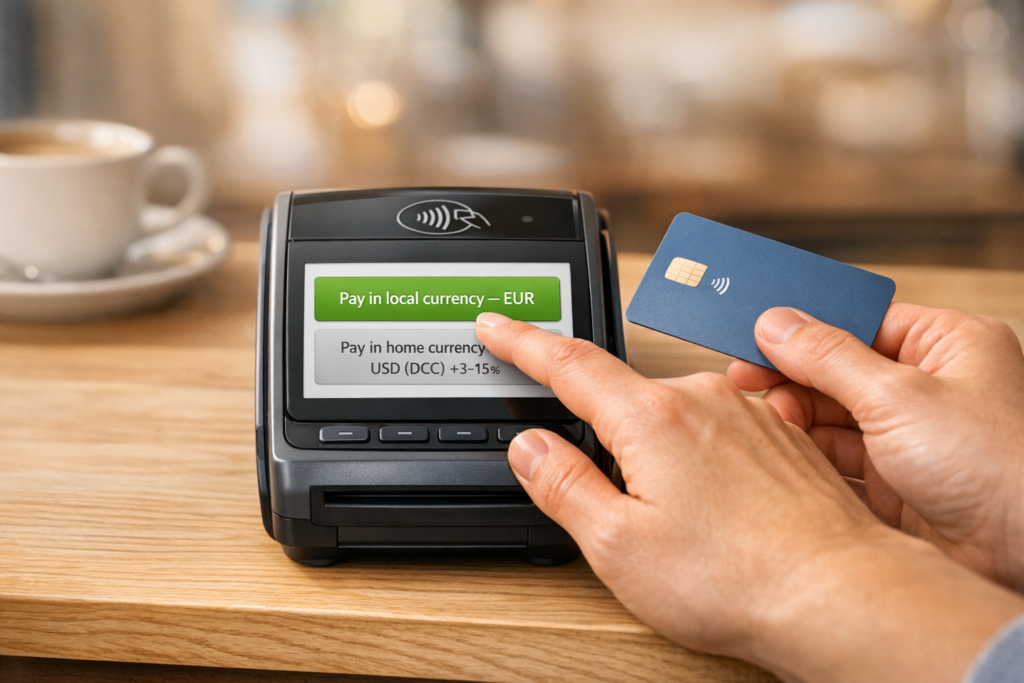
When you’re traveling abroad and using your card, the choice between Dynamic Currency Conversion (DCC) and paying in the local currency can significantly impact your expenses. Here’s the bottom line:
- DCC: Converts the purchase to USD at checkout but often includes high markups (3%-7%, sometimes up to 15%). You’ll see the dollar amount immediately, but you’ll likely pay more due to inflated rates.
- Local Currency: Lets your card network (Visa/Mastercard) handle the conversion, typically at better rates (0.5%-1% above mid-market). While you won’t see the exact dollar amount until later, this option usually saves you money.
Quick Tip: Always choose to pay in the local currency to avoid unnecessary fees from DCC. Combine this with a no-foreign-transaction-fee card for even greater savings.
Key Stats:
- DCC markups: 3%-15%
- Local currency conversions: ~0.5%-1% above market rate
- Example: On a $1,000 transaction, DCC could cost $60-$150 more than paying in local currency.
To save money, decline DCC every time it’s offered and stick to local currency payments.
Local Currency vs USD – Here’s What To Choose When Traveling Abroad
sbb-itb-e205081
What is Dynamic Currency Conversion (DCC)?
Dynamic Currency Conversion (DCC), sometimes called Cardholder Preferred Currency, is a service that instantly converts a foreign currency into U.S. dollars when you make purchases abroad. Here’s how it works: when you use your U.S. card at a merchant or ATM overseas, the terminal detects your card’s origin and gives you the option to pay in the local currency or have the amount converted to dollars right away.
It’s important to note that DCC is handled by third-party companies like Fexco, Euronet, or Monex in collaboration with the merchant – not by your bank or card network. As Investopedia explains:
The convenience of dynamic currency conversion (DCC) typically is offset by a poor exchange rate and additional fees that make the transaction more expensive.
Let’s break down how DCC operates and why it often comes with hidden costs.
How DCC Works
When you’re at the checkout counter or ATM, the terminal uses the merchant’s fixed exchange rate to convert the amount into dollars. You might see something like “Pay $45.80 USD” displayed alongside the local currency total. Sometimes, it’s presented with reassuring phrases like “Accept Guaranteed Rate” or “Proceed in USD”, which can make it seem like the safer choice. However, this convenience comes at a price.
The exchange rates used in DCC often include hefty markups – ranging from 3% to 7% above the mid-market rate. In extreme cases, markups have been as high as 18%. These inflated rates make DCC an expensive option compared to the rates offered by networks like Visa or Mastercard.
Key Features of DCC
DCC does offer one benefit: it shows you the dollar amount upfront, which can provide a sense of clarity. But this transparency is overshadowed by the high costs. While Visa and Mastercard typically charge around 1% above the mid-market rate for currency conversion, DCC markups can range anywhere from 2.6% to 12%, as found in a European study. On top of that, opting for DCC doesn’t eliminate any foreign transaction fees your bank might charge.
For context, Visa faced a fine of approximately A$18 million in 2015 for attempting to block DCC on its network to protect its own currency conversion revenues.
While the upfront pricing may seem convenient, it often leads to paying significantly more, making it clear why sticking to the local currency is usually the smarter financial choice.
What is Paying in Local Currency?
Paying in local currency means your transaction is processed in the currency of the country you’re in, with the exchange handled later by your card network or issuer. This is different from Dynamic Currency Conversion (DCC), where the merchant converts the amount at a fixed rate – often with a hefty markup. With local currency payments, your bank or card network uses real-time exchange rates, which are typically much closer to the mid-market rate.
Here’s how HSBC Bank USA explains it:
The rate your card provider uses when processing local currency payments will, in most cases, be lower than that of the merchant, or foreign bank, when paying in dollars (USD).
The process is straightforward: when you pay in local currency (like Euros), the transaction reaches your bank in that currency. Your bank then applies its exchange rate. In contrast, with DCC, the conversion happens before it reaches your bank, so the transaction is processed as if it were in USD. Let’s break down how this works in practice.
How Paying in Local Currency Works
When you use your U.S. card abroad and select the local currency option, the transaction stays in that currency until your card network – Visa or Mastercard – converts it to dollars. This conversion uses competitive exchange rates, typically within 0.5% of the mid-market rate. That’s a big improvement over DCC markups, which can range from 3% to 7%.
The final dollar amount will appear on your bank statement a day or two after the transaction settles. While you won’t see the exact USD total at checkout, the better exchange rate translates into significant savings.
Benefits of Local Currency Payments
The primary benefit? Saving money. By letting your card network handle the exchange, you avoid the inflated rates merchants tack on with DCC. A real-world example highlights this: a traveler withdrawing 100 GBP from a London ATM with an Estonian card was offered a DCC rate costing 135.51 EUR. By choosing local currency, the bank processed the transaction at 126.12 EUR – saving nearly 10 EUR.
If you’re using a credit card with no foreign transaction fees, the savings are even greater. Samuel Greengard, writing for American Express, explains:
If you use a card that has no foreign transaction fees and avoid DCCs by selecting the local currency payment option, you will usually come out ahead.
Even if your card charges typical foreign transaction fees (around 2% to 3%), paying in local currency still beats DCC, which can add fees totaling 6% or more of the purchase price. For instance, on a $1,000 hotel stay, opting for DCC could result in an extra $60 in unnecessary charges.
DCC vs. Paying in Local Currency: Comparison
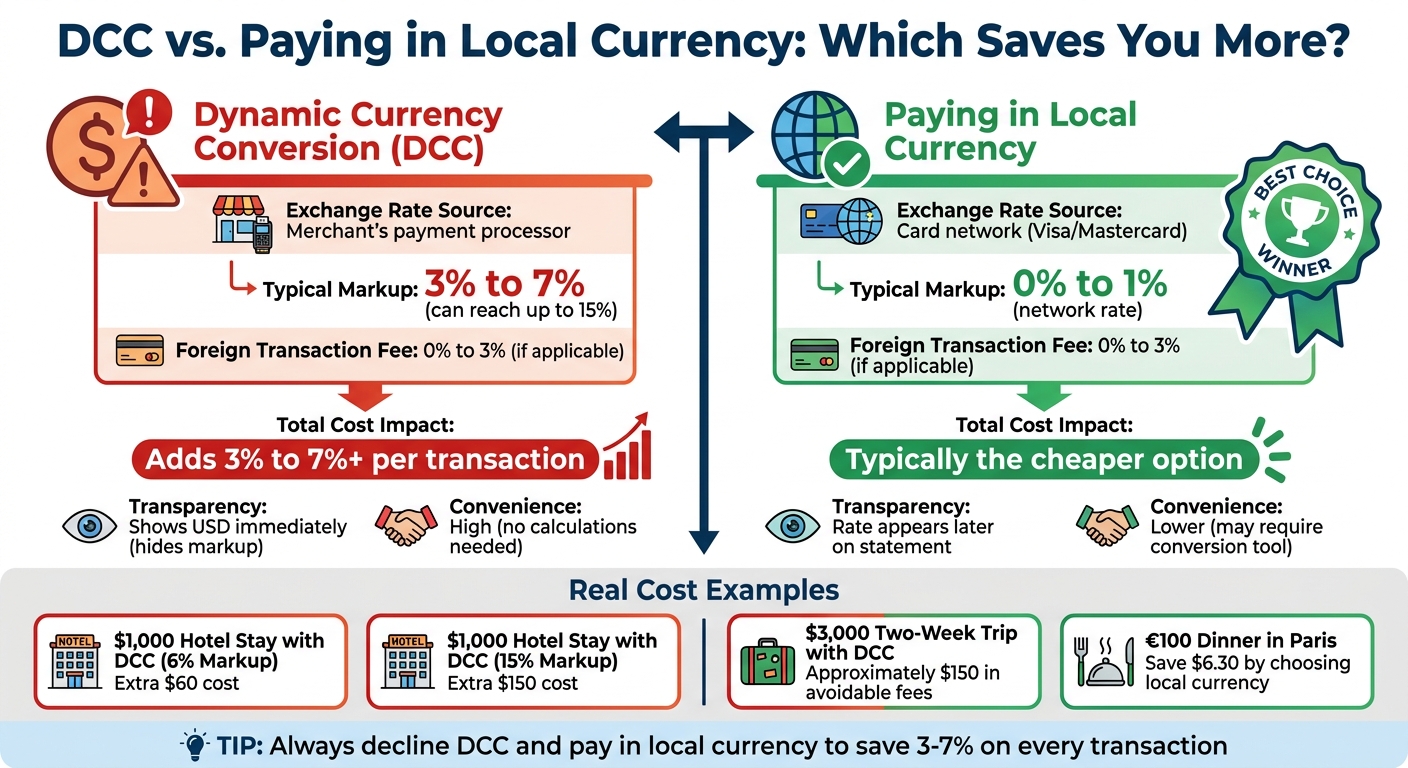
DCC vs Local Currency Payment Comparison: Fees and Savings
Let’s break down the two payment methods by looking at exchange rate control, fee levels, and cost visibility.
With Dynamic Currency Conversion (DCC), the merchant determines the exchange rate and converts your purchase to U.S. dollars on the spot. While it might seem convenient to see the USD amount immediately, this convenience often comes with a hefty price tag. Merchants typically apply significant markups – sometimes exceeding standard network fees by a large margin. Since the conversion happens at the point of sale, your bank or card issuer can’t apply the more competitive network exchange rates. Even if you’re using a premium card with no foreign transaction fees, you won’t escape these extra charges under DCC.
On the other hand, when you opt to pay in the local currency, your card network (Visa or Mastercard) processes the conversion. These networks typically use rates that are much closer to the mid-market rate, usually within 0.5% to 1%. The downside? You won’t know the exact U.S. dollar amount until the transaction posts to your account a day or two later. However, the savings can be substantial, making this option far more economical in most cases. The table below highlights the key differences between the two methods.
Comparison Table: DCC vs. Local Currency
| Feature | Dynamic Currency Conversion (DCC) | Paying in Local Currency |
|---|---|---|
| Exchange Rate Source | Merchant’s payment processor | Card network (Visa/Mastercard) |
| Typical Markup/Fee | 3% to 7% (can go up to 15%) | 0% to 1% (network rate) |
| Transparency | Shows USD immediately, hiding the markup | Rate appears later on your statement |
| Foreign Transaction Fee | 0% to 3% (if applicable) | 0% to 3% (if applicable) |
| Total Cost Impact | Adds 3% to 7%+ per transaction | Typically the cheaper option |
| Convenience | High (no calculations needed) | Lower (may require a conversion tool) |
Cost Impact on Your Transactions
The cost difference between these two methods can add up quickly. For instance, on a $1,000 hotel stay, a 6% DCC markup would tack on an extra $60. If the markup climbs to 15%, you’re looking at an additional $150 for the same transaction.
Now imagine a two-week trip where you spend $3,000. If you consistently accept DCC, you could end up paying around $150 in avoidable fees. Even if your card charges a 2% to 3% foreign transaction fee, paying in the local currency still saves you money compared to DCC, which can push total fees above 7%.
Why Paying in Local Currency Saves Money
Traveling internationally can get expensive, but one easy way to cut costs is by paying in the local currency. Why? Because it helps you dodge hefty conversion fees. When you pay in local currency, you’re getting exchange rates that are typically within 0.5% of the mid-market rate. On the other hand, Dynamic Currency Conversion (DCC) can tack on an extra 5% to 12% markup.
In fact, a study by the European Consumer Organization revealed that travelers using DCC in Europe ended up paying between 2.6% and 12% more compared to those who paid directly in the local currency. That’s a big difference for something as simple as selecting the right payment option.
“Always pay in the local currency of the country you’re in. Euros in France. Pounds in England. Yen in Japan. Baht in Thailand. If any screen, terminal, or person offers to convert your transaction into US dollars, say no. Every time. No exceptions.” – Candice Ollila, Travel Currency Guide
If you combine this approach with a no-foreign-fee credit card, the savings stack up even more. Avoiding both DCC markups and foreign transaction fees is the ultimate money-saving strategy.
Savings with No-Foreign-Fee Credit Cards
Using a no-foreign-fee credit card means you’re taking full advantage of local currency exchange rates. Cards like the Chase Sapphire Preferred or Capital One Venture X allow you to benefit from Visa or Mastercard’s daily exchange rates, with only a 0.5% markup. Even American Express, which is slightly higher at 0.8%, still beats the fees you’d face at retail currency exchanges.
Here’s the kicker: a frequent traveler taking three international trips a year could lose around $300 annually by using a card with foreign transaction fees. Add DCC to the mix, and that traveler could be paying over 6% on every purchase. By sticking to local currency payments and a no-foreign-fee card, you can avoid both the 3% issuer fee and the extra DCC markup of 5% to 12%.
Examples of Savings on Travel Expenses
The savings really come to life when you look at real-world scenarios. Take this example from July 2024: American Express Credit Intel analyzed a four-night hotel stay costing $1,000. A traveler who opted to pay in their home currency via DCC ended up paying an extra $60 (6%) in unnecessary fees. That’s $60 that could have gone toward a memorable dinner or a fun activity.
Dining costs are another area where this adds up fast. Imagine a €100 dinner in Paris (around $110 USD). If you use a card with a 3% foreign transaction fee, your meal costs $113.30. But if the merchant offers DCC at $115, you’re losing an extra $6.30 compared to paying in local currency with a no-fee card. Multiply those kinds of fees across meals, shopping, and excursions, and the losses pile up.
Even online shopping benefits from this strategy. When buying from international retailers like Amazon.co.uk, choosing to pay in the site’s local currency (GBP) instead of converting to USD avoids hidden fees. Whether it’s withdrawing cash, booking hotels, or buying train tickets, sticking to local currency consistently saves you money compared to DCC.
How to Avoid DCC and Pay in Local Currency
Dodging Dynamic Currency Conversion (DCC) is straightforward if you stay vigilant. Remember, DCC is an optional merchant service – you’re not obligated to use it. Knowing how to spot it and respond can save you money.
Steps to Decline DCC at Point of Sale
When making a purchase, you might not see “DCC” explicitly mentioned. Instead, you’ll likely be asked if you want to pay in U.S. dollars or the local currency. Always opt for the local currency, such as euros in France, yen in Japan, or pounds in the UK. If a staff member asks, simply reply, “Charge me in [local currency].”
Before finalizing the transaction, check that the amount on the payment terminal is displayed in the local currency. If it’s in U.S. dollars, ask the merchant to void the transaction and reprocess it in the local currency. Declining DCC not only avoids unnecessary fees but also helps stretch your travel budget further.
At ATMs, look for options like “Proceed without conversion” or “Continue without conversion.” For example, if prompted with “Press YES for dollars, NO for euros”, hit NO. This ensures your bank applies its own exchange rate.
For online purchases, make sure the checkout page displays the local currency. If using PayPal, select the option to charge in the local currency instead of using PayPal’s conversion rate, which can tack on an extra 3% to 4%.
Using Currency Conversion Apps
To ensure you’re getting a fair rate, use trusted currency conversion tools. Apps like XE provide real-time exchange rates and even let you save rates for offline use. If you have an iPhone, the built-in Calculator app includes a currency converter under the “Convert” function.
You can also check rates directly through Mastercard and Visa’s official exchange rate calculators on their websites. These tools display the exact network rate, so if a merchant’s terminal shows a worse rate, you’ll know DCC is in play.
Tips for Flight and Travel Bookings
When booking international flights or accommodations, always choose to pay in the local currency of your destination. This allows your card network to handle the conversion at a more favorable rate.
Make sure your credit card supports local currency transactions to avoid extra fees. Pairing local currency payments with a no-foreign-transaction-fee card is one of the best ways to save money while traveling.
If you discover that a merchant charged you in U.S. dollars without your consent, you can file a dispute with your bank or through your card network’s compliance program. Merchants are typically required to give you the option to pay in the local currency. These steps help ensure your international transactions remain cost-effective.
For additional help with international bookings, consider services like Flight Booking 247. They offer round-the-clock support and connect you with travel experts to secure deals while ensuring transactions are processed in the destination’s currency.
Conclusion
When weighing DCC (Dynamic Currency Conversion) against paying in local currency, the latter is clearly the smarter choice for saving money while traveling abroad. Credit card networks typically charge a conversion fee of around 0.5% above the mid-market rate, compared to DCC’s steep markup of 3% to 7%. On a two-week trip with $3,000 in expenses, that difference could save you anywhere from $90 to $210. Watch out for terms like “guaranteed rate” or “proceed in USD”, as these often signal inflated exchange rates. As Candice Ollila aptly advises:
“The only defense against DCC is refusing it yourself, every single time”.
To stretch your travel budget even further, pair this approach with a credit card that doesn’t charge foreign transaction fees. These fees can quietly eat into your spending power if you’re not careful.
Staying on top of your spending abroad is simple: always opt for local currency and double-check your receipts immediately. If you spot a charge in USD that you didn’t agree to, request that the merchant void the transaction and reprocess it in the local currency.
Every decision at the register counts. By declining DCC and sticking with local currency, you ensure that more of your money goes toward the experiences that make your trip memorable.
FAQs
How can I tell if a terminal is trying to use DCC?
A terminal is applying Dynamic Currency Conversion (DCC) if it gives you the choice to pay in your home currency (like USD) instead of the local one. This option is a clear indication that DCC is in use.
Will I still pay extra if I pick local currency but my card has foreign fees?
If your card includes foreign transaction fees, you’ll still incur those charges even when opting for the local currency. These fees usually range from 1%–3% of the transaction amount and are applied no matter which currency you select. That said, choosing to pay in the local currency can help you sidestep dynamic currency conversion (DCC) fees. DCC fees often come with extra markups and less favorable exchange rates, making the local currency the smarter choice overall – even with foreign transaction fees.
What should I do if I was charged in USD without agreeing to it?
If you were charged in USD without agreeing to it, avoid dynamic currency conversion when making purchases or withdrawing cash at ATMs. This service typically adds a markup of 3–7%. Always ask to be charged in the local currency instead. If the transaction has already gone through, reach out to your bank or credit card issuer to dispute the charge.